Troubleshooting
Common Evrima bugs & fixes
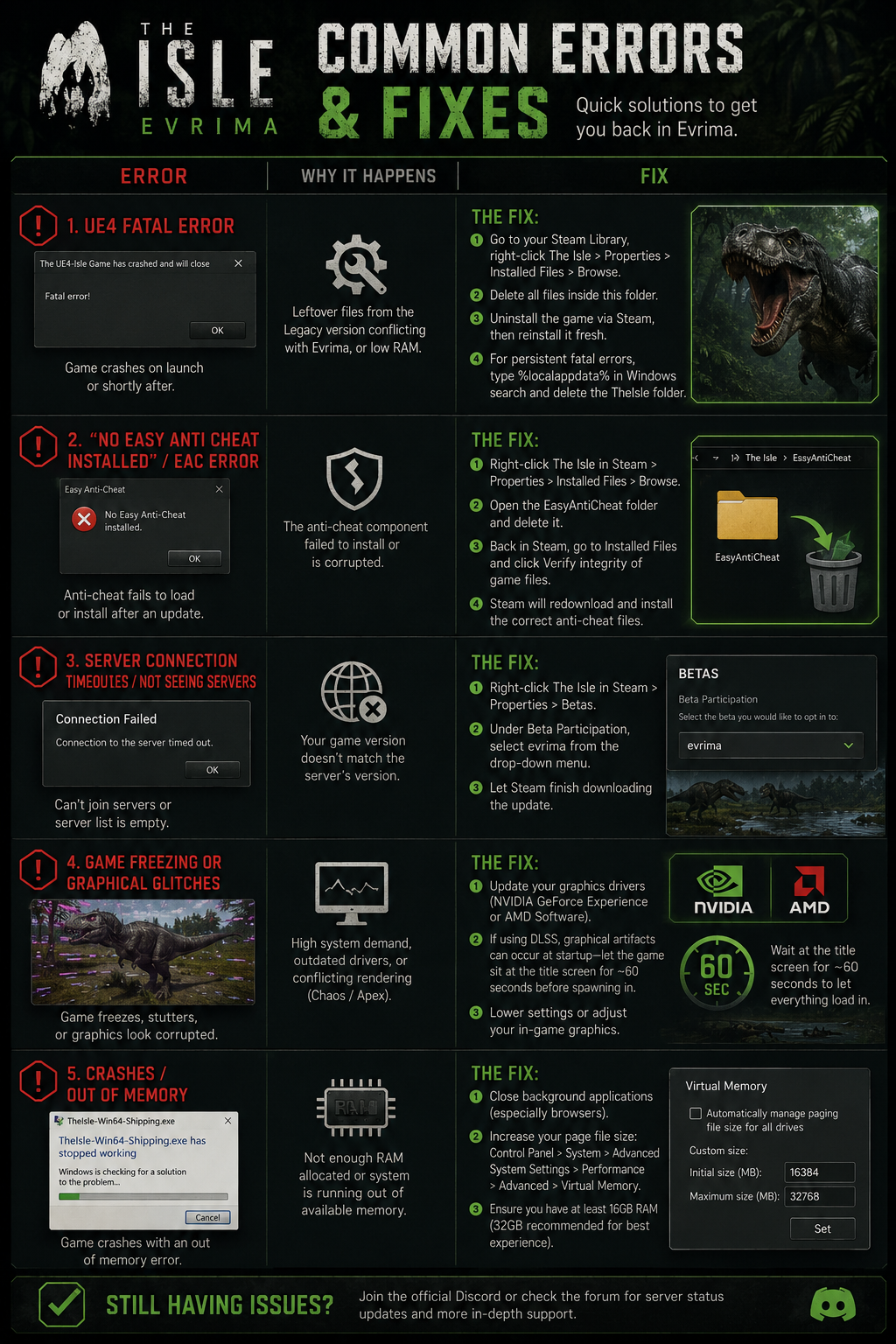
Most Evrima bugs collapse to one of four cure-alls — hard log, wipe the Config folder, verify files, reinstall Easy Anti-Cheat. Start with whichever fits, then dig into the specific list below if it's still broken. Patch versions are noted where the bug first showed up; some have since been quietly fixed and may not affect you.
The four cure-alls — try these first
- 01Hard log
Press Esc, click Logout, and let the menu sit. Your dino stays in the world for a few minutes (still attackable), so do this somewhere safe — a hide, deep water, a cave corner. When you reconnect to the same server, almost every state-stuck bug clears: food won't eat, can't drink, can't pounce again, ghost meat on your face. This is the single most useful move in the troubleshooting list.
- 02Wipe the Config folder
Quit the game, open File Explorer, type %localappdata% in the address bar, open TheIsle → Saved, and delete the Config folder. Resets every keybind, every graphic setting, and your skin slots — but unsticks the reset-on-chat bug and most input lockouts that survive a restart. Treat as a heavier reset than a hard log.
- 03Verify game files
Right-click The Isle on Steam → Properties → Installed Files → Verify integrity of game files. Steam replaces anything mismatched. Fixes most launch failures caused by partial updates and the second half of the EAC repair flow below.
- 04Reinstall EAC
Right-click The Isle on Steam → Properties → Installed Files → Browse… Delete the EasyAntiCheat folder, then run Verify integrity of game files. Steam pulls the missing files back; next launch installs EAC fresh. Solves nearly every variant of the anti-cheat-blocked-launch error.
Game won't launch
- Easy Anti-Cheat not installed / untrusted system file
Run the EAC reinstall sequence above (delete the EasyAntiCheat folder, then Verify integrity). EAC is what The Isle launches the game executable through, so a broken install blocks every launch until the folder gets restored.
- No official servers / empty old map
You're probably still on the Legacy branch. In Steam, right-click The Isle → Properties → Betas, and switch the Beta Participation dropdown to the Evrima public branch. Wait for the update, then relaunch. Full walkthrough on the install page.
- Plugin failed to load (e.g. "ExampleDeviceProfileSelector")
This usually means a fragmented or partially-corrupted install. Quit Steam, manually delete the entire The Isle folder under steamapps/common/, then uninstall via Steam and reinstall from scratch. Skipping the manual delete leaves stragglers behind that the reinstall won't replace.
- DX12 not supported
Force DX11 by adding -dx11 to The Isle's launch options (Properties → General → Launch Options). Some older GPUs and outdated driver stacks won't initialize DX12 cleanly even when the install thinks they should.
Crashes, fatal errors, performance
- UE4 Fatal Error popup
Three things to try in order: update your GPU drivers, verify game files, then if it's still chronic, do a clean reinstall (manually wipe the install folder before letting Steam reinstall). Memory leaks and stale shader cache are the usual suspects.
- Random disconnects, big FPS drops, CPU/GPU thrashing
Often blamed on the engine running both Chaos and Apex physics modules in parallel — having two physics systems active causes intermittent stalls and disconnects. There's no clean user fix; treat it as a known engine-level issue and keep an eye on patch notes.
- Infinite loading screen on launch (with DLSS)
DLSS takes a moment to warm up — on lower-spec machines (<16 GB RAM, slow disk) the first launch after a patch can sit on the loading screen for a minute or two. If it still hangs, turn DLSS off in graphics settings from a safe hidden spot once you're in.
Stuck or can't move
- Can't move at all (stuck in place)
Quickest cure: hard log. If the server has an unstuck command, use that. A friendly dino knocking you over also breaks the state — you'll take some damage from the hit, but you'll be unstuck.
- Hypsi tail stuck up / can't jump
Change motion states briefly. Jump off a small ledge to fall, or swim into water and back out. Reentering the standing state from another animation clears the stuck flag.
- Deino can't stop death-rolling
Mash Q while heading back toward the shoreline, then rest with H. If the loop continues, swim a bit further out and come back — the goal is to break the chain of stuck eat-actions by changing context.
Food bugs — can't eat, ghost food, stretched chunks
- Can't eat or drink — animation fails instantly
Step away from the food source, spam your Grab key several times, then try again. If it still won't trigger, hard log. The bug is the server thinking you're already holding something in your mouth.
- Stuck organ / meat-chunk on face
From your client it looks like you dropped or swallowed it, but other players can scent it from far away. This is often blamed on ESP hacks but it's a state-sync bug. Hard log to clear it. Same fix applies for herbivores carrying diet chunks.
- Diet won't register / plant despawns mid-bite
Server didn't acknowledge the chunk was consumed. Hard log and try again.
- Carnivore meat warps and stretches across the map
Same family as the face-attached organ bug — your held item is rubber-banding for other clients and broadcasting your position. Hard log; there's no in-world fix.
- Food fills but doesn't give nutrients
Hard log. The hunger bar moves but the diet meter doesn't tick — same disconnect between client and server state, same fix.
Pounce, vomit, and combat bugs
- Omni / Troodon pounce motorcycle bug
You finished a pounce, the camera jerked, and now you can sprint on your end but other players see you sliding around in the pounce animation. Pounce again into the ground — that resets the state. You're stuck in the bug for about 5–10 seconds in the meantime, and your tap-pounce damage still landed before it broke.
- Pounce fails to start at all
Sometimes the animation never plays. Reposition and try again; if it sticks, hard log. Often correlates with server load.
- Stego tail-swing doesn't connect on higher ground
Hit detection on the tail clip is unreliable against targets above the Stego's elevation, even when the swing visibly passes through them. No user-side fix — work around it by repositioning so the target is at or below tail height.
- Vomit lock fails — attacker still gets hit
A defender's vomit usually stops incoming attacks for a few seconds. Sometimes one slips through anyway (most often on Stego swings, Carno gores, Teno tail). Nothing the defender can do; just be aware the lock isn't a guarantee.
- Cerato vomit-cancel bile bug
Bile gets above the trigger threshold but never fires the vomit. Has been observed at high, mid, and low hunger — no consistent trigger yet. Just be aware your vomit may not deploy on demand.
Chat, parties, keybinds
- Can't open the chat box / nothing types
Press F10 twice. If that doesn't work, hard log. There's a long-running bug where opening chat at all (F6 to toggle, included) resets keybinds and disables the chat input — if it triggers after a relog, the safest play is to avoid chat that session.
- Keybinds keep resetting / Manual Alt Attack keeps un-ticking
Same family as the chat bug above. Restart the game without opening chat, and wipe the Config folder if it persists. Devs are aware.
- Can't invite anyone to your party
Hard log. The other player should also see the invite prompt after — if they don't, both relog.
- Nightvision won't activate
Try the alternate bind: Alt + N (or X). If neither works, wipe the Config folder (clears stuck input state at the cost of resetting keybinds).
Nesting
- Compies die on your nest and rot the eggs
If you kill a compy that spawns on your nest, the corpse blocks you from resting on the eggs. There's no clean workaround — relocate, or wait it out and hope the corpse despawns before the eggs do. QA is aware.
- One-sided mating pair (nest without mutual call)
Repeatedly spamming the mating call sometimes registers a pair on one client even though the other dino never called back. Result: a nest forms without both players consenting. No user fix — be aware that calls do occasionally one-side this way.
Other quirks
- Safe-log lost dino at server restart
Logging out close to a server restart sometimes wipes your save — you reconnect into character select. To minimize the risk, safe-log at least 5 minutes before the restart window, or skip safe-log entirely and hard log instead. After a hard log your dino sits in the world for ~5 minutes (attackable, no growth/stamina regen), then despawns cleanly. Same bug can hit you while you're offline if a restart happens then, just much more rarely.
- Sniff locks your input — only WASD + sprint respond
Pressing or holding the sniff key can leave the scent marker visible and lock every other input until it fades. Wiping the Config folder is the dev-suggested fix but it doesn't always take. If it locks, wait it out.
- Spectate leaves a hitbox in the world
Admins entering spectate sometimes leave the dino's hurtboxes behind for other players to hit — admin gets damaged or bled in spectate. Server-side bug; nothing the admin can do besides leave spectate.
- Cerato keeps chuffing in spectate
If you enter spectate mid-chuff, you'll keep producing the chuff audio at your last position, and your character will visibly chuff silently when you respawn until you bite or crouch.
- Show Edible Plants admin filter shows nothing
Currently broken — the overlay returns no markers. No user-side workaround.
Reporting a new bug
Repro steps, your patch version, and a short video clip make a bug report ten times more useful than a screenshot. The dev team triages through the official Discord and the in- launcher feedback form. If you can recreate it on demand, say so explicitly — those are the ones that get fixed first.
Related
- • Install The Isle: Evrima — switching to the Evrima public branch if you ended up on Legacy.
- • Play on unofficial servers — finding community servers, dealing with full lobbies, server-side restarts.
- • Combat & damage types — context for the pounce / vomit / Stego tail-swing bugs.